Replace repetitive steps with tools that fit your workflow.
Custom applications and integrations for surveying, SUE, AEC, and business operations. Start with one clearly scoped workflow and a first version your team can evaluate.
Book a 30-minute consultSee examplesWhat a first version looks like
Two illustrative tools built to show the shape of the work: the friction they remove, what the user does, what comes out, and why it matters. Not client software.
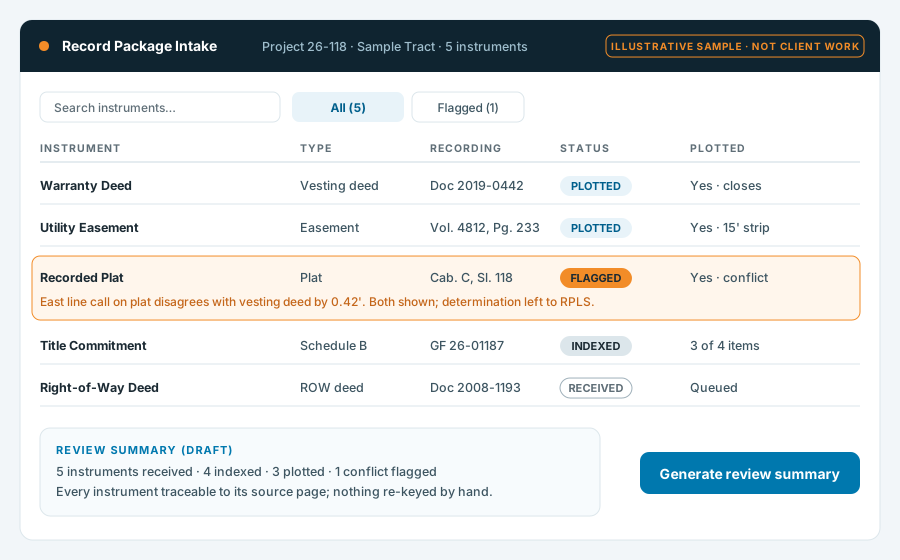
Record-package intake with traceability
Friction: instruments arrive by email and get re-keyed into three places. Action: drop the package in once. Output: every instrument indexed, plotted status tracked, conflicts flagged for the RPLS, and a draft review summary. Benefit: nothing lost between intake and the drawing.
Illustrative sample. Not client work.
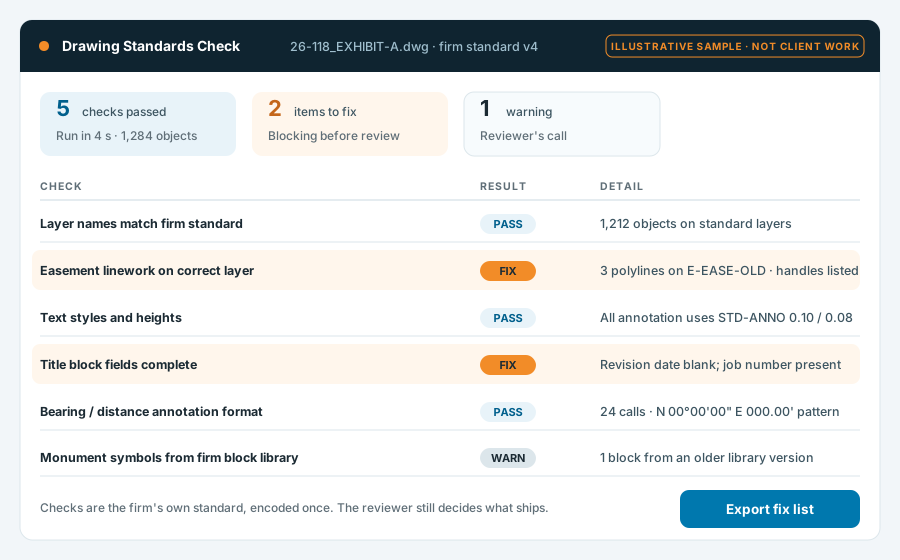
Drawing standards check before review
Friction: the reviewer spends the first pass catching layer and title-block problems. Action: run the firm's own standard against the drawing. Output: a pass/fix list with object handles. Benefit: the reviewer starts at the judgment calls.
Illustrative sample. Not client work.
Two tracks, one way of working
Both start the same way: a conversation about the workflow, a written scope, and a first version small enough to judge before anything bigger is committed.
Surveying, SUE & AEC tools
Software for the work itself, designed by someone who has done the work. Fieldwork-review tooling here is software your team runs — not a field-data-processing service.
- Deed and record-package intake, indexing, and traceability
- Exhibit, plat, and sketch-set automation
- CAD standards tooling and drawing validation
- Fieldwork review checks and data handoffs between field, office, and deliverable
Business operations tools
The unglamorous software that keeps a company running — built to fit how you actually operate.
- Intake, scheduling, and work-order tracking
- Reporting and dashboards from the systems you already pay for
- Integrations that end the re-keying between those systems
- Document generation with an audit trail
Scoped, shown early, handed over properly
Workflow review
We walk the workflow as it actually runs — who touches what, where the re-keying happens, which systems are already in place. Output: a written scope for a first version.
Scoped prototype
A working first version of the one workflow in scope, in your environment or mine, built to be judged on real work.
User feedback
The people who'll use it try it on live tasks. What they trip on gets fixed before anything else is added.
Acceptance and handoff
Acceptance against the written scope, then handoff: source, documentation, access, and what support looks like — all set out in the work order.
No fixed build times are promised before integrations and complexity have been assessed. The fit call is where that starts.
What happens once it ships
Who owns the source code?
The work order says so before the build starts. The default position is that a tool built for your firm is yours; general-purpose components and libraries I bring to it are licensed to you, not transferred.
Where does it run?
Wherever fits your data-custody rules: your environment, a hosted environment set up for you, or an isolated workstation. Decided at scoping, not after.
Who pays platform and hosting costs?
You do, directly, on accounts you own — so nothing depends on my continued involvement. Expected costs are estimated in the work order.
How are access and data handled?
Your data stays on accounts and infrastructure you control. Access I need for the build is scoped, listed in the work order, and removed at handoff unless support continues.
What documentation is delivered?
A README that explains how to run, configure, and deploy the tool, how data flows through it, and where its limits are — enough for another developer to pick it up.
What support is included, and how are future changes scoped?
Each work order names a support window for defects. Changes and additions are scoped as new work orders — small ones stay small.
Describe the tool you wish existed.
Thirty minutes is enough to work out whether the next step is a configuration change in something you already own, a scoped build, or deeper discovery.
Book a consult